




Compare the 7 best ticketing systems for 2026, including top help desk and IT ticketing platforms, and find the right fit for a scaling support team.
A ticketing system that leaves customers waiting, repeating themselves, or feeling like nothing but a number is more than a nuisance — it’s a business risk. Service shapes most customers’ perception of a brand, and more than half would switch vendors after just three bad experiences. In other words, getting ticketing right is incredibly important.
But traditional ticketing systems were built for a different era of customer service. One where email was the main comms channel and “fast” meant replying within 24 hours. Today, people expect quick, personalized responses through chat services, social media, and beyond.
In this guide, we’ll showcase some of the best customer service ticketing systems for 2026 and lay out how they improve communication, automate workflows, and help teams collaborate faster.
What is a ticketing system? Why it’s still the heart of great service
A ticketing system is a centralized platform where people submit requests or raise issues. It allows agents to track, prioritize, and resolve these “tickets” from multiple channels without switching between tools. This means faster resolutions, better organized conversations, and more consistent support.
There are many types of ticketing systems, but here are the main ones:
Customer service ticketing system: designed for customer-facing teams to manage inquiries, complaints, and feedback across multiple channels
IT ticketing system: used by internal IT and technical support teams to handle employee requests, troubleshoot issues, and manage assets
Shared inbox platform: centralizes team email and chat conversations for faster responses without losing context
Enterprise service management (ESM) platform: expands traditional help desk capabilities across departments like HR and finance to standardize internal service delivery
Omnichannel support platform: integrates live chat, email, phone, social media, and self-service options into a single interface for a unified customer experience
Today’s customers demand faster, more personalized support, even from smaller companies. In response, modern ticketing platforms prioritize collaboration, visibility, and human connection.
As Kenji Hayward, Front’s senior director of support, puts it: “I’m seeing more teams carve out time for ops-focused projects: documenting internal processes, building better tooling, refining ticket routing logic, tuning automations. This is the work that creates leverage, the kind that lets small teams do big things.”
7 of the most popular ticketing system software platforms in 2026
There are many different software platforms on the market, each designed for different team sizes, industries, and workflows. But the best helpdesk ticketing systems take repetitive tasks off your plate while scaling with your business.
Here are the top tools for 2026 that’ll make your day-to-day workflows easier.
1. Front
While Front isn’t a traditional ticketing system, it’s a collaborative customer operations platform with many of the same benefits, bringing every customer interaction into a single, shared workspace.
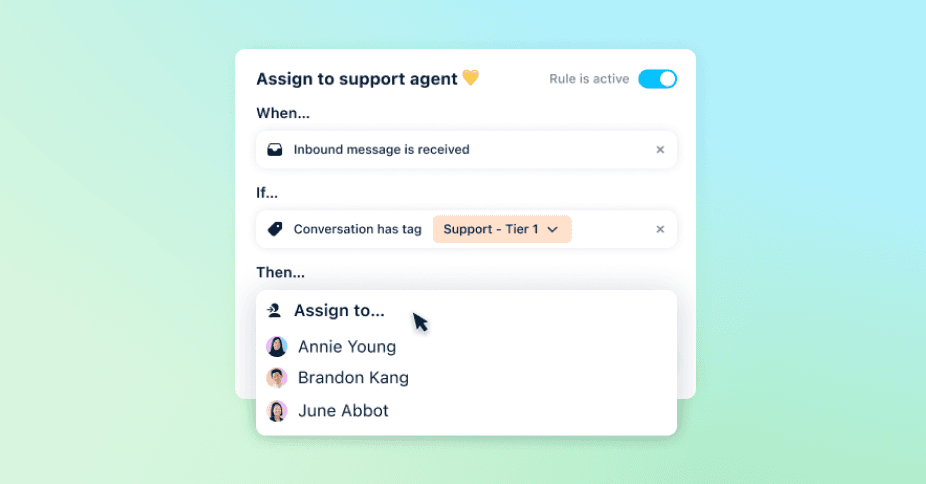
With features like shared inboxes, automated routing, contextual AI replies, and real-time analytics, your team can coordinate next steps seamlessly, resolve issues faster, and deliver a more personal customer experience — without relying on rigid tools or third-party consultants.
Pros:
The only AI-powered ticketing system on this list built specifically for collaborative customer operations — not just tickets.
Empowers your team to manage the customer journey from end to end, with no need for IT support or costly consultants.
Surfaces root causes and bottlenecks automatically using AI trained on your real conversations.
Cons:
Since Front is built for B2B teams with complex customer operations, smaller B2C companies that aim to deflect as many tickets as possible might not utilize its full suite of features
2. Zendesk
Zendesk is a legacy support platform built for ticket volume instead of team collaboration. It centralizes communication across channels but relies on traditional workflows and manual intervention.
Pros:
Deep feature set and mature ecosystem with strong brand recognition.
Offers extensive integration with CRMs and analytics platforms.
Cons:
Manual ticket triage leads to slower resolution and context switching.
No unified customer profile — agents often operate without full context.
SLA tracking can be cumbersome and inconsistent.
3. Freshdesk
Freshdesk (a product of Freshworks) is designed for speed and simplicity, with AI that’s better suited to basic tasks than complex customer interactions. Like many ticketing tools, Freshdesk automates responses and offers summaries, but the platform struggles with visibility and scale.
Pros:
Quick to set up for small teams with simple needs.
Cost-effective options for teams just getting started.
Cons:
Locks features like in-depth analytics and reporting behind higher-cost plans.
AI capabilities are limited to surface-level tasks like summaries and translations.
Lacks depth in workflow customization and scalability for larger teams.
4. Help Scout
Help Scout offers a lightweight help desk experience for smaller teams. It has a clean shared inbox and friendly interface, but its AI-driven suggestions lack the full-context intelligence needed for high-volume or complex support.
Pros:
Intuitive shared-inbox style interface without a steep learning curve.
Strong focus on customer-friendly interactions like live chat and email widgets.
Cons:
Limited AI capabilities and automation compared to more robust platforms.
Omnichannel coverage is narrow — lacks support for SMS or social channels.
No unified customer record, intelligent routing, or queue prioritization.
5. HubSpot Service Hub
HubSpot Service Hub is an extension of its CRM — built for marketers first, with service features added on. It connects data across teams but wasn’t purpose-built for customer support.
Pros:
Deep integration with HubSpot CRM for marketing-sales-service data.
Built-in knowledge base, multi-channel support, and automated ticketing workflows.
Cons:
Seat-based pricing can become expensive as teams scale.
Workflows are rigid and tricky to customize without CRM expertise.
Steep learning curve for teams without dedicated technical or operations staff.
6. Zoho Desk
Zoho Desk offers basic help desk capabilities with solid integrations for Zoho users, but its AI tools and automation features are limited in flexibility and depth. While AI-powered bots called Zia Agents handle scripted tasks, they lack the adaptability needed to support complex, high-touch service environments.
Pros:
Simple to integrate with other Zoho apps and third-party tools.
Intuitive interface and easy setup.
Cons:
Advanced features like custom dashboards and AI assistants are locked behind higher-tier subscriptions.
The text editor, email templates, and ticket updates can be sluggish and glitchy.
Notification delays and email-sync issues impact reliability.
7. ServiceNow
ServiceNow is an enterprise-grade platform built for IT operations — not customer-facing teams. It offers powerful automation but requires significant setup and technical resources. Its AI tools are optimized for internal use cases and require extensive configuration to work for external support.
Pros:
Built for complex, cross-functional workflows with enterprise-grade SLA tracking.
Powerful automation and incident routing for IT-heavy environments.
Cons:
High cost of ownership (licensing, implementation, and ongoing support).
Steep learning curve to configure and adapt for customer service use cases.
Overbuilt for teams without dedicated IT resources or technical support.
Why modern support platforms outperform legacy ticketing tools
Traditional ticketing tools are good at tracking one-to-one customer queries. One problem to one support rep. More often, it’s a little more complicated than that. Other teams might need to get looped in. Customer context is often spread across systems and tools, which need to be gathered into the ticket.
In fact, the typical B2B company spends nearly 3 hours coordinating for every hour actually solving customer problems. Traditional ticketing tools are infamously known for being problematic in bringing in additional context into the ticket — meaning those Slack DMs, extra email threads, or disconnected third-party systems make it even more difficult to keep all the context together during any handoffs. That’s a recipe not only for customers to repeat themselves, but also for support teams to look in more places to get all the information they need.
Here’s what sets tools like Front apart:
Faster teamwork and resolution: Shared inboxes, internal notes, and smart routing keep teams aligned and customers out of the queue.
Clear accountability: Every conversation has an owner, a timeline, and full visibility so nothing slips through the cracks.
Consistent experiences across every channel: Whether customers reach out via chat, social, or email, the context carries through.
Insights that fuel continuous improvement: Real-time analytics reveal customer trends and gaps, helping teams optimize as they go.
Scale support without losing the personal touch
From email to chat to social, Front brings every customer conversation into a single shared workspace, so your team can respond faster, collaborate with context, and stay in control of the customer experience
With built-in AI, automation, and performance insights, Front makes it easy to streamline handoffs, reduce busywork, and deliver thoughtful, personalized support at scale.
Ready to see modern, high-performing customer service in action? Request a demo today to see how stress-free support can be.
FAQs
What are the main types of ticketing systems?
Ticketing systems come in many forms, including customer service software, IT help desks, shared inbox platforms, enterprise service management (ESM) platforms, and omnichannel support systems. Each type serves a different use case, from resolving customer inquiries to managing internal IT requests.
How do ticketing systems improve customer service?
Ticketing systems centralize conversations, making it easier for support teams to assign, track, and resolve issues. The best modern platforms go further, offering built-in collaboration, automation, and analytics to help teams deliver faster, more personalized, more consistent service.
Can AI fully automate ticketing workflows?
AI can handle many routine tasks, like auto-categorizing tickets, suggesting replies, or routing inquiries to agents. But full automation isn’t the goal. Platforms like Front combine contextual AI with team collaboration to keep service both fast and thoughtful.
How do I create a support ticket system?
You can create a support ticket system by choosing a platform that brings all your customer conversations into one place, offers automation where it counts, and scales with your team. Tools like Front offer built-in templates, no-code workflows, and integrations that help you launch quickly — no consultants or custom builds required.