





Explore the top Help Scout alternatives for 2026, compare how they’re built, and learn how to choose the right platform as your team scales.
Help Scout works well as a customer service tool for centralized support environments, but cracks start to appear as conversations spill across teams.
What once provided clarity and defined ownership begins to fall short when multiple teams come into play. Coordination breaks down, causing slower replies, missed service-level agreements (SLAs), fragmented self-service experiences, and rising operational costs.
That’s when it’s time to consider Help Scout alternatives. In this article, you’ll discover the most worthwhile options and how to choose a platform that can grow with your team.
What makes a platform a better fit than Help Scout
Finding “better” alternatives isn’t about a broader feature set, larger marketplace, or even Help Scout’s pricing. It’s about operational reliability as coordination pressure grows, especially in B2B environments where customer conversations span teams and systems.
For support and operations leaders, the real question is whether their customer service software can maintain clarity and control as complexity grows. That means evaluating:
Ownership clarity across every interaction
Handoff reliability between teams and functions
Visibility across teams to unify the customer experience
Confidence in reporting that reflects reality — not just activity
Controlled automation and AI support execution
Most ticketing systems, including Help Scout, are designed to optimize queue management and meet SLAs, not to coordinate ongoing, multi-team conversations. That’s why the right fit supports how your team operates at scale.
How to choose the right fit for your team
While there’s no universally “best” customer service or operations platform, different tools cater to different operating systems. It’s up to you to set the relevant standards for your team.
To achieve this, look beyond the feature lists. Instead, use a set of decision lenses to evaluate how well a platform holds up as complexity increases.
Team size and complexity
As teams scale — adding more channels, workflows, reporting needs, and self-service resources — you’re more likely to outgrow Help Scout.
The fix is simple: Prioritize coordination. That’s where friction shows up first and teams feel it the most.
On paper, everything might look fine: tickets move and SLAs are met. But behind the scenes, teams are piecing together how others operate, recalibrating for different stakeholders, and re-solving issues that were handled three months ago but never surfaced. That hidden drag can easily derail progress.
A coordination-first platform keeps day-to-day operations smooth and closes alignment gaps faster.
Cross-functional involvement
Feature gaps often dominate conversations about Help Scout alternatives. But there’s a bigger driver that’s harder to ignore: cross-functional involvement.
As soon as support is no longer the sole owner of customer conversations, requirements change. Product teams need structured feedback loops, customer success needs continuity and context, and engineering needs clear, reliable escalation paths within the workflow.
What worked for one team starts to break across many. Without shared visibility and clean handoffs, work stalls in the gaps and the quality of customer support declines.
The right platform helps unify teams around the same conversation, not fragment them across tools.
Reporting needs
When assessing alternatives, consider inspection-level reporting. Basic queue metrics are the starting point, but turning them into actionable insights often requires manual effort.
A better platform surfaces operational friction directly, giving teams confidence in reporting and making it easier to prioritize improvements and roadmap decisions as you scale.
Automation depth
“Faster replies lead to better customer support.” That’s a half-true statement many teams use without realizing that they can’t automate their way into nuanced, context-aware conversations.
Automation and AI assistance help with repetitive, well-defined tasks, such as ordering checks, getting shipment updates, and drafting replies based on customer history. But neither can replace structured workflow orchestration across teams.
That’s the real test of any alternative: whether automation and AI support execution while keeping humans in control — or whether they introduce noise and fragmentation.
Long-term scalability
Late migrations are expensive, operationally and culturally. What works for a small team doesn’t often match what a larger team needs under growing complexity, volume, and cross-functional demands.
Choosing a system built for durability early on reduces the risk of replatforming later and ensures your team can scale without losing clarity or control.
Top 5 Help Scout alternatives in 2026
Before diving into the structural fit and operational architecture of each tool, it helps to understand how the leading alternatives compare across pricing, collaboration, reporting, automation, and AI capabilities.
The table below highlights the key differences at a glance.
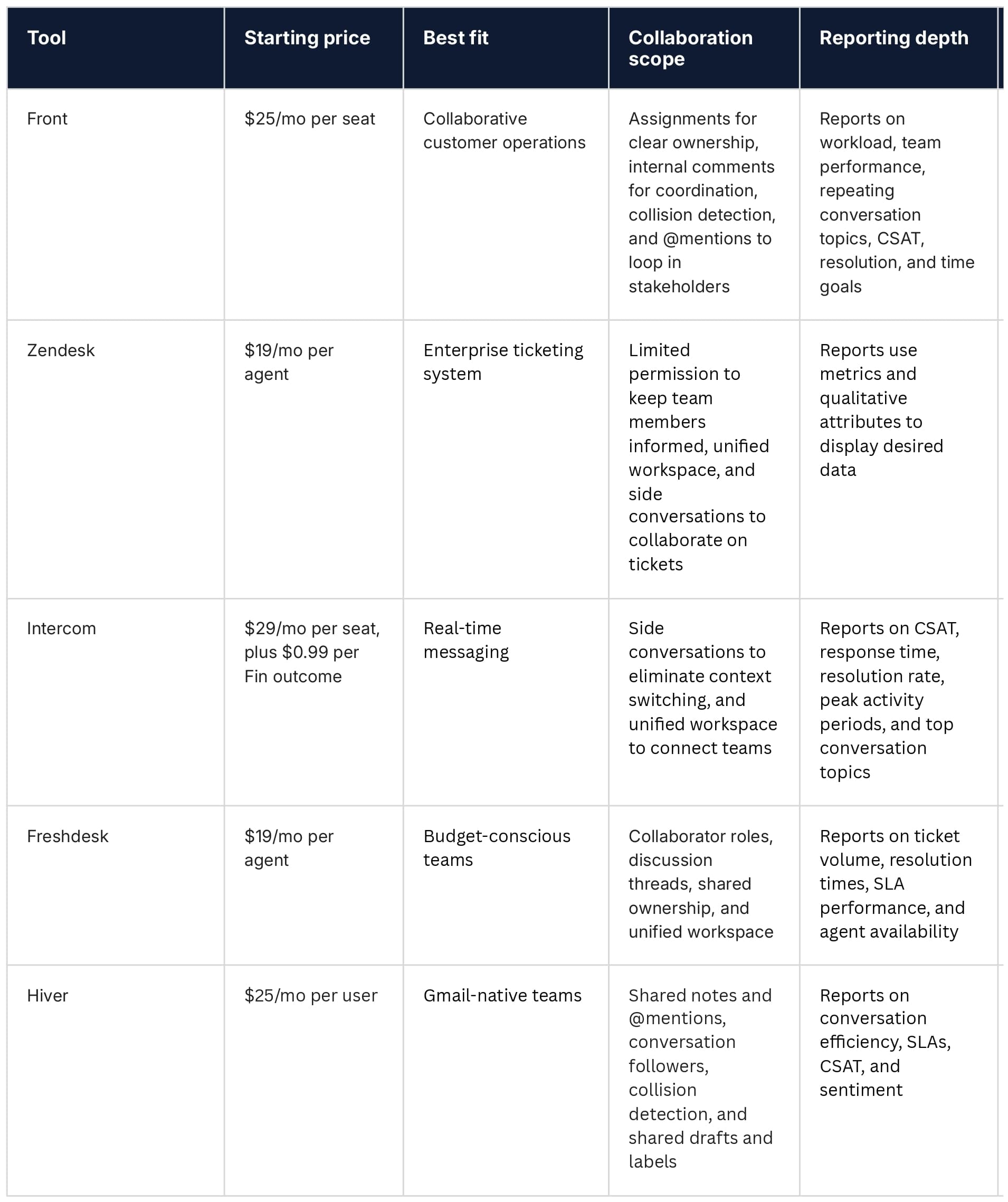
The goal of this comparison is not to crown a winner, but to help you understand structural fit. While these platforms share similarities, they’re ultimately built on different operating assumptions.
Here are the top Help Scout competitors to consider.
1. Front: Best for collaborative customer operations
Front is a customer operations platform purpose-built to handle the coordination and context behind complex B2B customer relationships. It’s structured around conversations rather than tickets, which changes how ownership, collaboration, and visibility show up in customer communication as work moves across roles.
Because work rarely stays confined to a single queue, Front offers explicit ownership controls, such as conversation assignments and collaborative threads, to preserve context and make coordination visible.
Front’s AI is built as a supervised execution layer rather than deflection-first automation. That means repetitive work, such as handling common requests, can be handled through AI-assisted replies, summarization, and quality checks while your team stays in control.
This conversation-first architecture is well-suited for B2B environments. However, smaller B2C teams prioritizing ticket deflection and high-volume, transactional support may not need its full collaboration and operations capabilities.
Watch Front in action, from routing to resolution:
2. Zendesk: Best for enterprise ticketing
Zendesk is a customer service platform with a ticket-first architecture. It centralizes communication in a single workspace, automatically routes tickets to the right team member, and provides prebuilt dashboards to identify agent knowledge gaps.
As a legacy tool, Zendesk also offers a mature, connected ecosystem with an extensive integration library, making it a strong choice for enterprise customers. Zendesk is also easily scalable and supports structured workflows and standardized reports that clearly answer questions like, “How many tickets do I have in an open status?”
However, Zendesk’s ticket-first model can feel restrictive for conversation-based teams that prioritize internal collaboration, and its extensive feature set often requires heavier configuration to adapt.
3. Intercom: Best for real-time messaging
As another legacy customer service tool, Intercom centers its features around real-time messaging and AI. It offers side conversations to eliminate context switching, so queries live in the same place for both external partners and internal experts.
Intercom also offers extensive integrations with customer relationship management (CRM) platforms, analytics, and engagement tools. Its AI chatbot model, Fin, is integrated within the main service platform and automates repetitive tasks by learning from your policies and knowledge base.
While Intercom’s shared inbox provides visibility within the live chat context, it doesn’t cover every stage of customer communication, especially if you need a unified multi-channel view, team collaboration, and customer history in one place.
4. Freshdesk: Best for straightforward ticket management
Freshdesk is a cost-effective, AI-powered customer service platform built around a traditional ticket system model. Unlike its sister product, Freshdesk Omni, Freshdesk is designed for teams that prioritize straightforward ticket management over more complex, conversation-driven workflows.
Team members can resolve tickets and preserve customer history in a central workspace, while resolving tickets from email, phone, WhatsApp, and social media.
With built-in ticket routing, statuses, and lightweight automation, Freshdesk covers the core needs of smaller B2B or software-as-a-service teams looking for quick implementation and predictable workflows. That said, Freshdesk’s automation and AI capabilities tend to struggle with complex, multi-step interactions, especially when it’s time to scale.
5. Hiver: Best for Gmail-native teams
Hiver supports email, chat, Slack, and voice, but unlike Help Scout, it’s built specifically for teams living in Gmail. It neatly combines shared inboxes with light CRM-style support, making it easy for Gmail-centric teams to manage customer communication without leaving their inbox.
Hiver uses shared inboxes and Slack for routing, escalation, and collaboration, with AI-powered drafting and summaries. But limited integrations and potential scaling issues can surface as teams grow.
Remember that each platform was built around different structural assumptions, so what looks “bad” for one team could perfectly suit another.
Ultimately, the right fit depends on your workflows, the number of teams involved in each conversation, and how coordination needs evolve over time.
Beyond Help Scout: Front is built for the complexity that comes with scale
As teams grow, simple systems such as Help Scout and traditional help desk tools may struggle to manage multi-team workflows, maintain context across channels, and meet SLAs.
That complexity is normal. The question is whether your customer service software is built to handle it.
Front is designed for B2B customer operations, helping support teams unify communication and orchestrate workflows. Its AI and automation take repetitive tasks off your team’s plate while keeping them in control of what matters, ensuring every interaction holds up as complexity increases.
When your workflows outgrow a single team or channel, Front is the execution layer built for what comes next.
Explore the platform today.